
- Employer Resources
- |
- Last Updated: May 20, 2026
iHire Product Update: Freelance Marketplace Launch – April 2026
Welcome to iHire’s product update for April 2026 – it’s a big one. After months of hard work, discussions with our users, and market research, we’re thrilled to announce our industry-specific freelance marketplace.
As our recent survey showed, 61% of candidates are interested in freelance or independent contract work. At the same time, employers are increasingly turning to these non-traditional types of workers to fill skills gaps quickly and scale their businesses.
Now, candidates and employers can look no further than iHire for their freelance and project-based job search and hiring needs.
Why iHire for Freelance Jobs?
Unlike crowded, global freelance marketplaces and gig platforms, iHire connects companies with U.S.-based professionals who have direct experience in their industry. Similarly, job seekers are matched with relevant, verified opportunities in their area of expertise.
Another key differentiator of our platform is our ability to support blended workforces. We believe the most successful organizations will comprise a mix of traditional employees (full-time, part-time, seasonal, intern, etc.), independent contractors, and freelancers – whatever it takes to get the work done. On iHire, you get the best of both worlds. Whether you need an FTE or a contractor to handle a short-term project, you can find the right talent with us.
How to Hire Freelancers on iHire’s Platform
Hiring freelancers on iHire’s platform is simple. To get started, sign in or create an account.
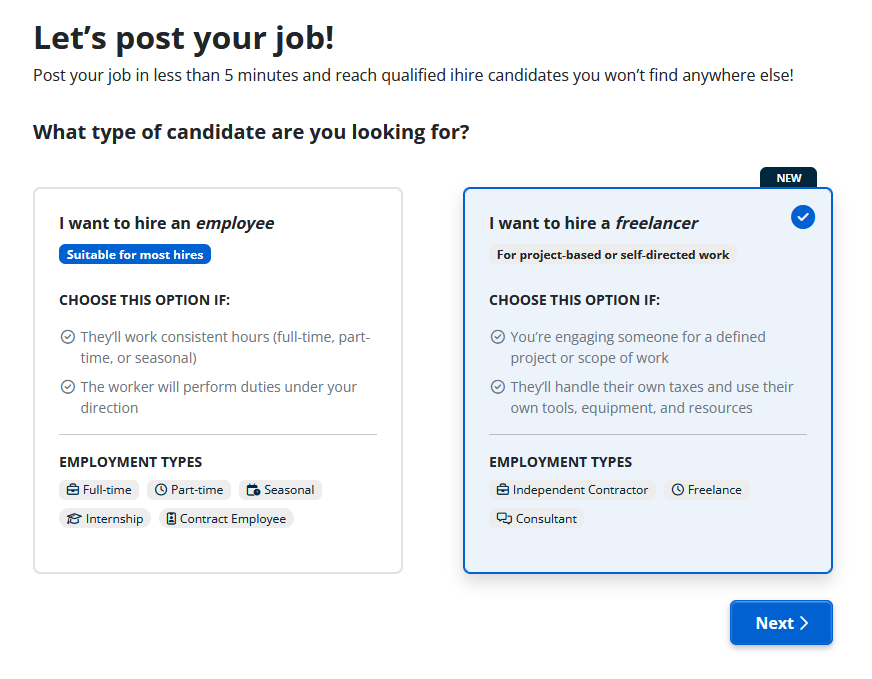
Post a freelance job by selecting “Post a Job” on your dashboard. Choose “I want to hire a freelancer.”
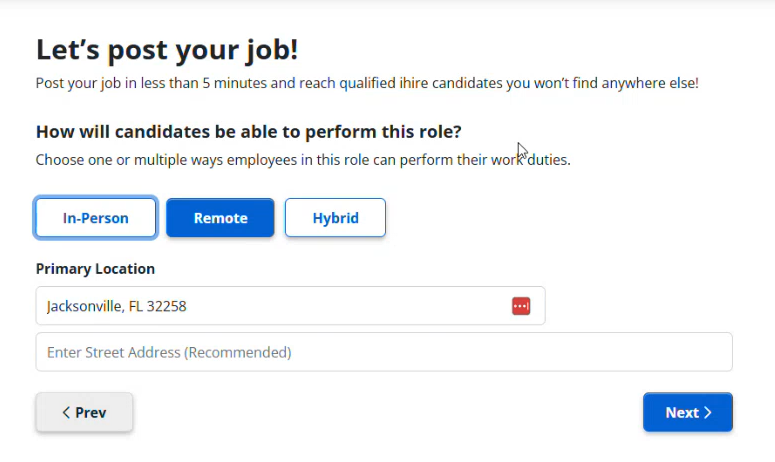
Next, choose how the candidate will perform the freelance job (in-person, remote, or hybrid) and indicate the primary location for your workplace.
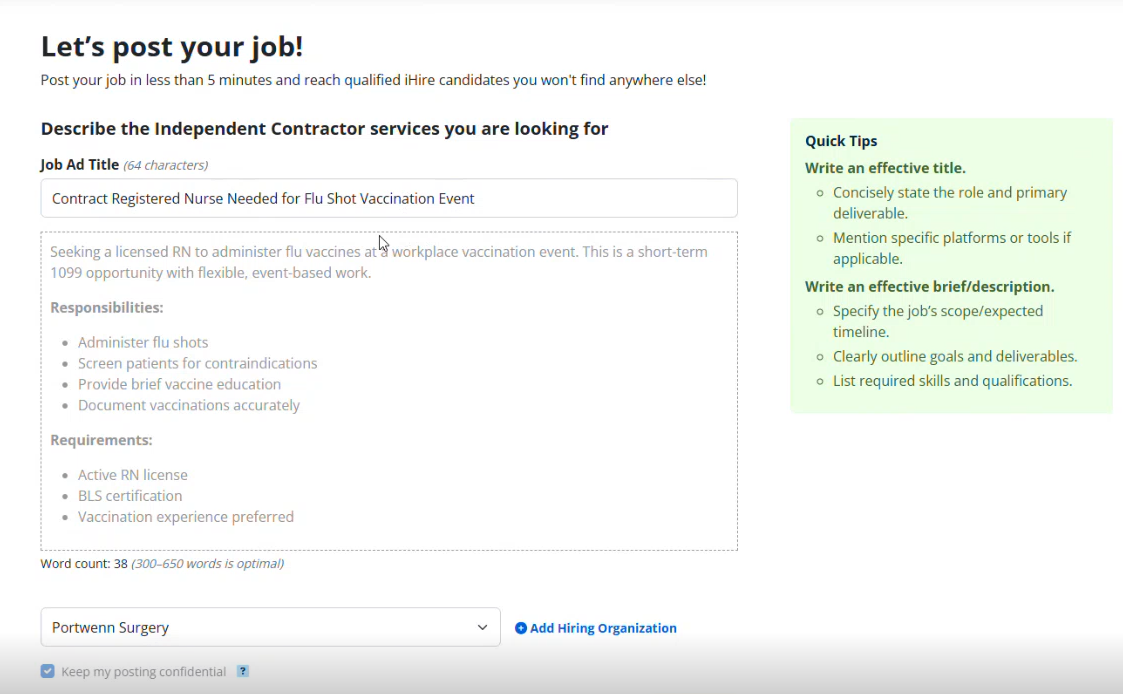
Then, create the job description/project brief for your ad. The title should concisely state the role and primary deliverable, and mention specific platforms or tools, if applicable. The brief should include the job’s scope and expected timeline, clearly outline goals and deliverables, and list required skills and qualifications.
On the next screen, choose the skills your ideal candidate should possess. We’ll automatically suggest skills, and you can enter and search for your own.
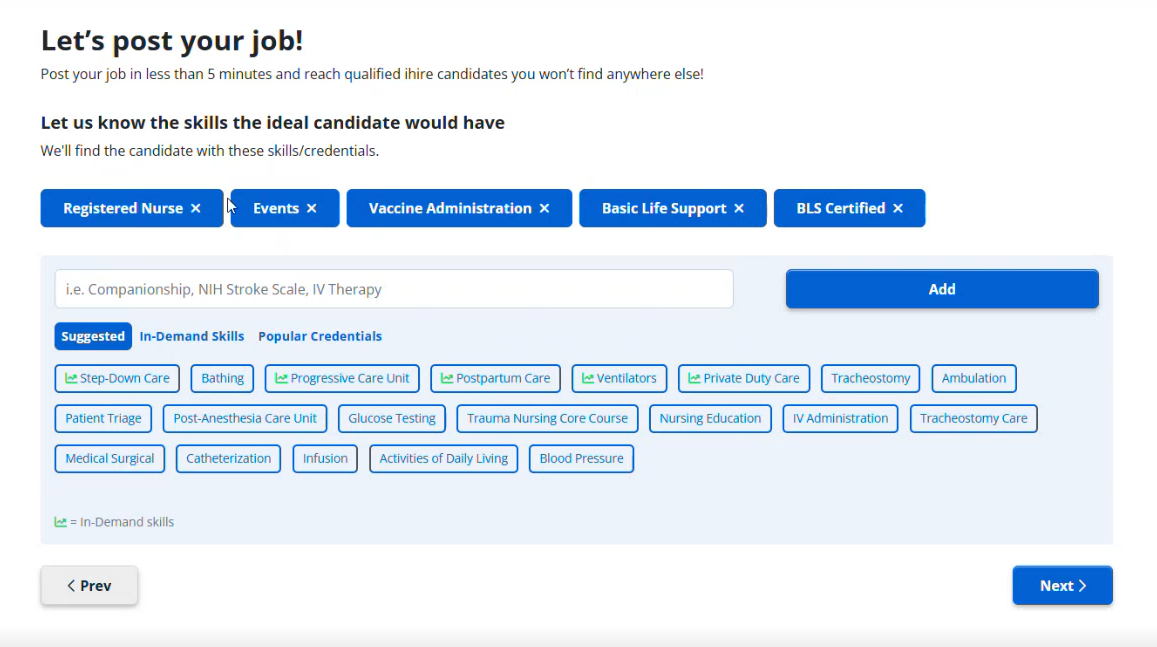
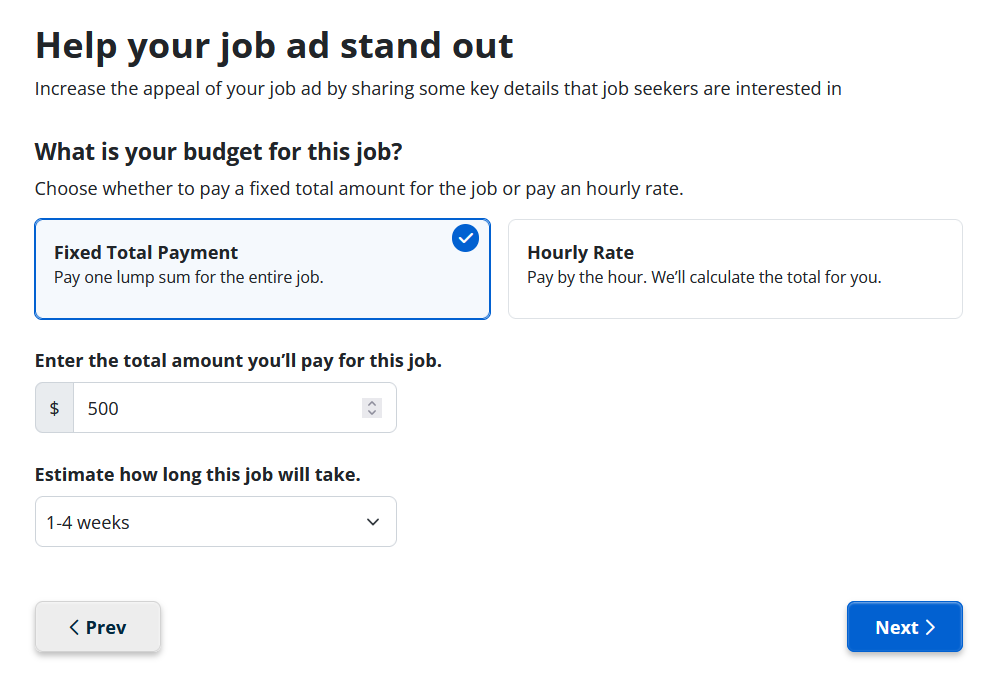
Once you’ve input skills, you’ll specify budget of the job. First, choose whether you will pay a fixed total amount (pay one lump sum for the entire job), or an hourly rate.
If you choose the fixed total payment, you will then enter the total amount you’ll pay for the job and how long the job will take (e.g., 1 week or less, 1 to 2 weeks, more than 6 months, etc.).
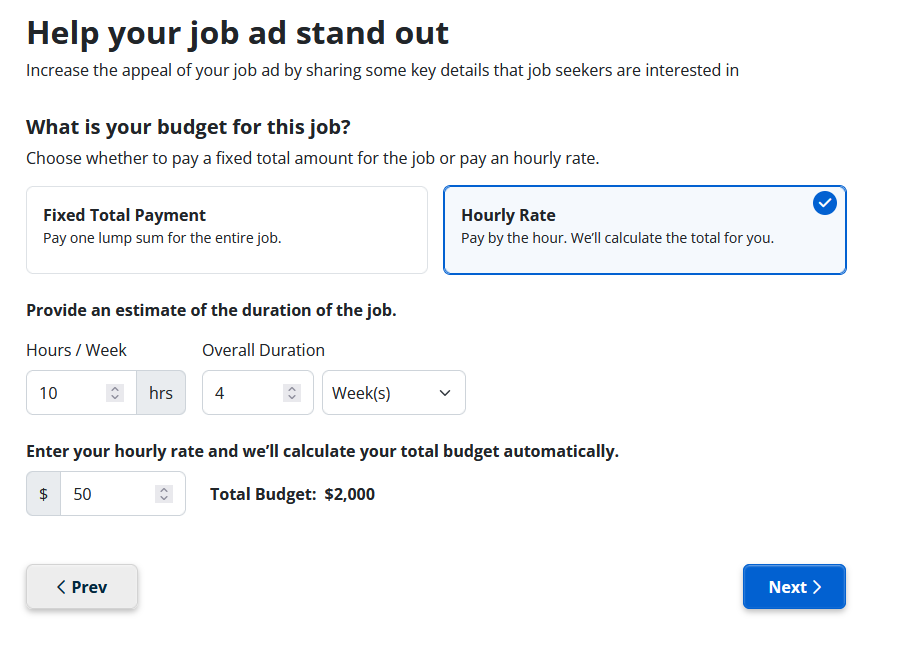
If you choose the hourly rate option, you’ll provide an estimated duration of the job – how many hours per week will the freelancer work, and over the course of how many weeks or months?
Then, enter an hourly rate, and we’ll calculate the total budget for the job.
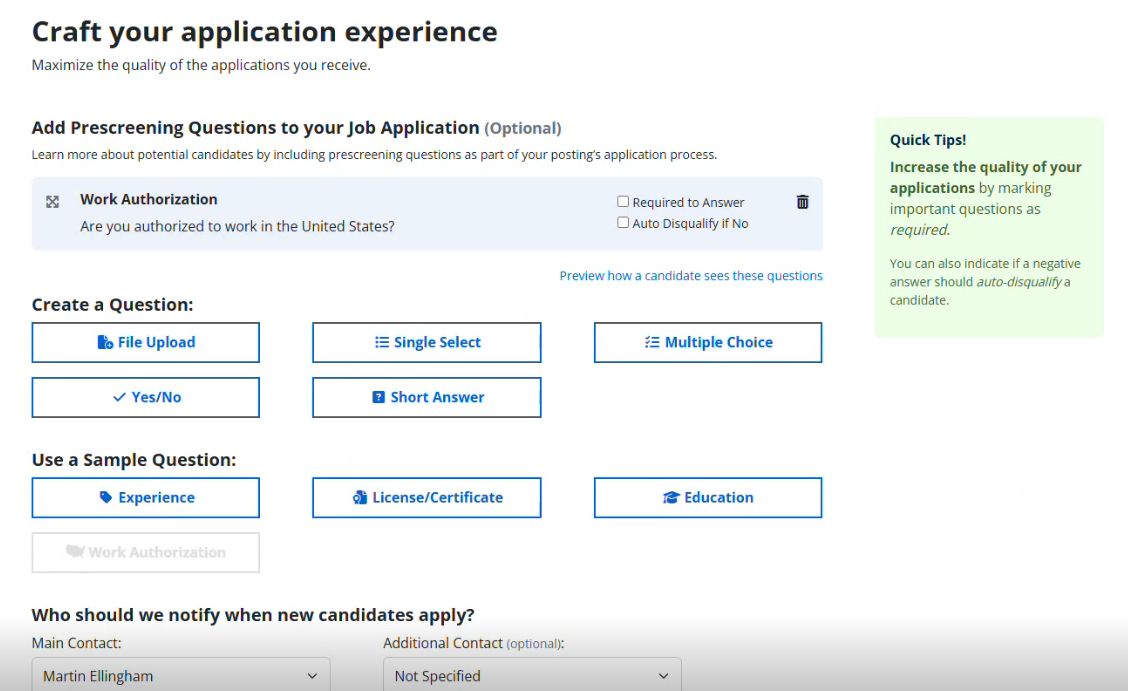
You can then add a few finishing touches to your ad, such as including prescreening questions and specifying which team members will be notified of new applicants.
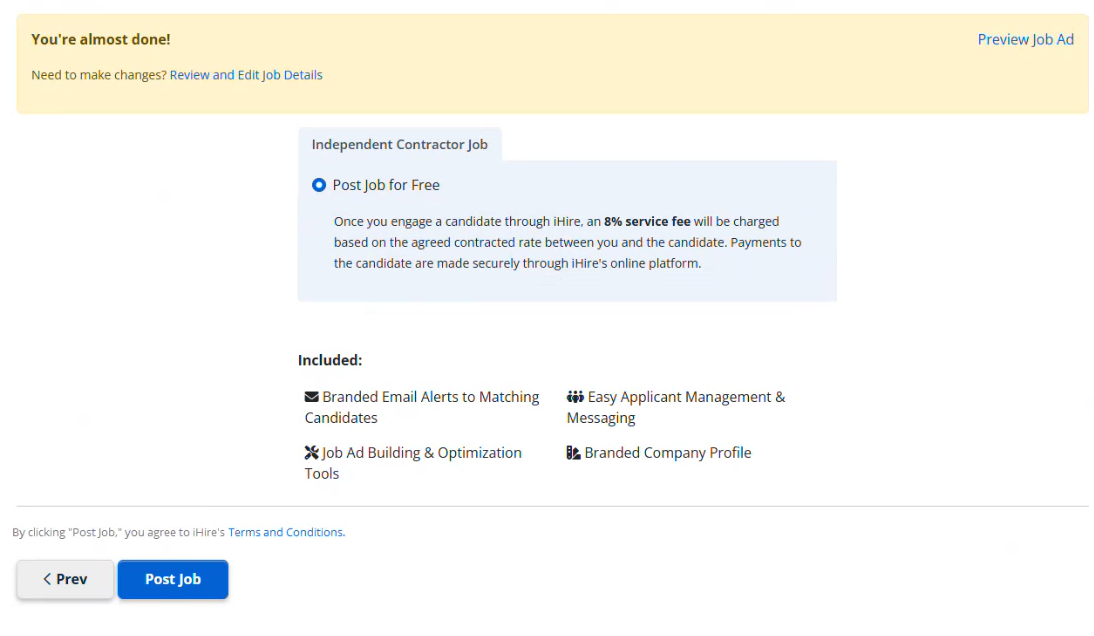
Finally, you may preview your job ad and make additional changes if necessary. Select “Post Job” when you are ready to set it live.
Create Your Free Account Today
Find freelancers, FTEs, and everything in between

We value your privacy.
How to Make an Offer to a Freelance Candidate
When a candidate applies for your job, you’ll receive their proposal and can view their iHire profile, which includes their photo, last activity, work samples, strengths and interests, resume, and more details. If you choose to make an offer, select “Send an Offer.”
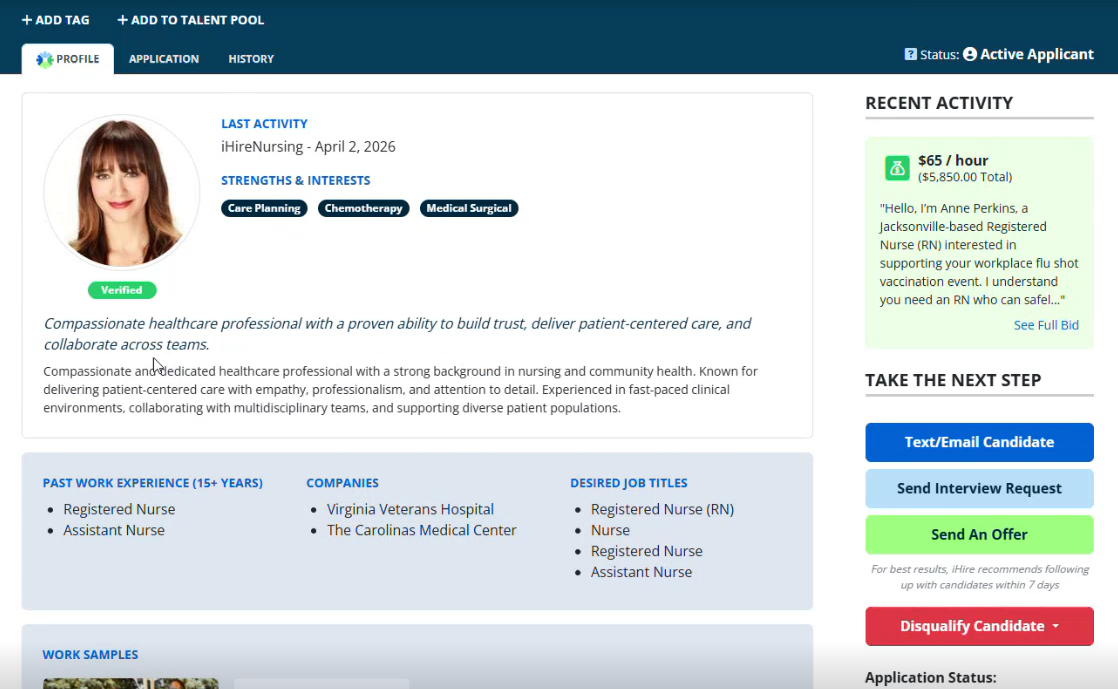
If you don’t have a credit card on file, you will be prompted to add a new payment method before sending an offer. If you already have a credit card on file, you will enter the “Draft Offer” flow.
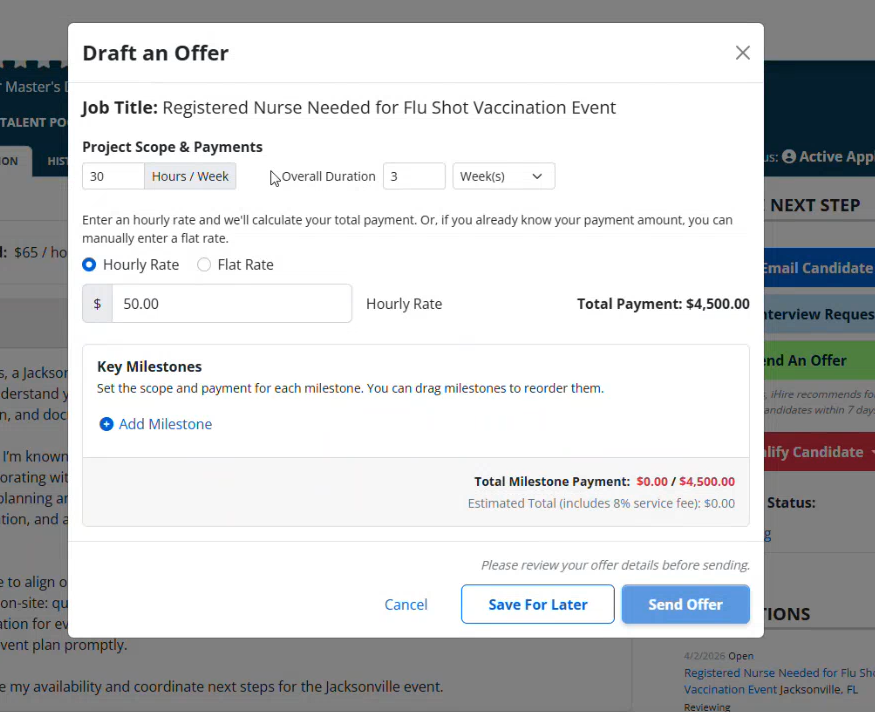
Your offer must include the project scope, duration, and rate (hourly or flat rate). You will also need to add at least one milestone and set the scope (due date) and payment for each. Include a name for each milestone and a description.
At the bottom, you’ll see the total milestone payment, which includes the +8% service fee (learn more about how the service fee works here).
Hit “Send Offer.”
After sending an offer, the candidate has 72 hours to respond – hopefully, accepting your offer and getting started making an impact.
For more detailed information on posting freelance jobs and managing candidates, agreements, and milestones, visit our Employer Help Center.
More iHire News
Don’t just read about it – try out our freelance marketplace for yourself! Employers can learn more and get started here, while job seekers can dive in here.
For more iHire news and product updates, stay tuned to our Press Room and Resource Center.

Originally Published: April 30, 2026
RELATED RESOURCES



Hiring? You're in the Right Place.
- Reach unique talent: 51% of our candidates aren't using other job boards
- Connect your ATS and get 6x more applications with iHire's apply process
- Get matching candidate resumes sent straight to your inbox
We Value Your Privacy